CMSB v3.82 Released (Improved UI, Menu Count Badges, & .env support)
17 posts by 7 authors in: Forums > CMS Builder
Last Post: March 3, 2026 (RSS)
By Codee - March 1, 2026
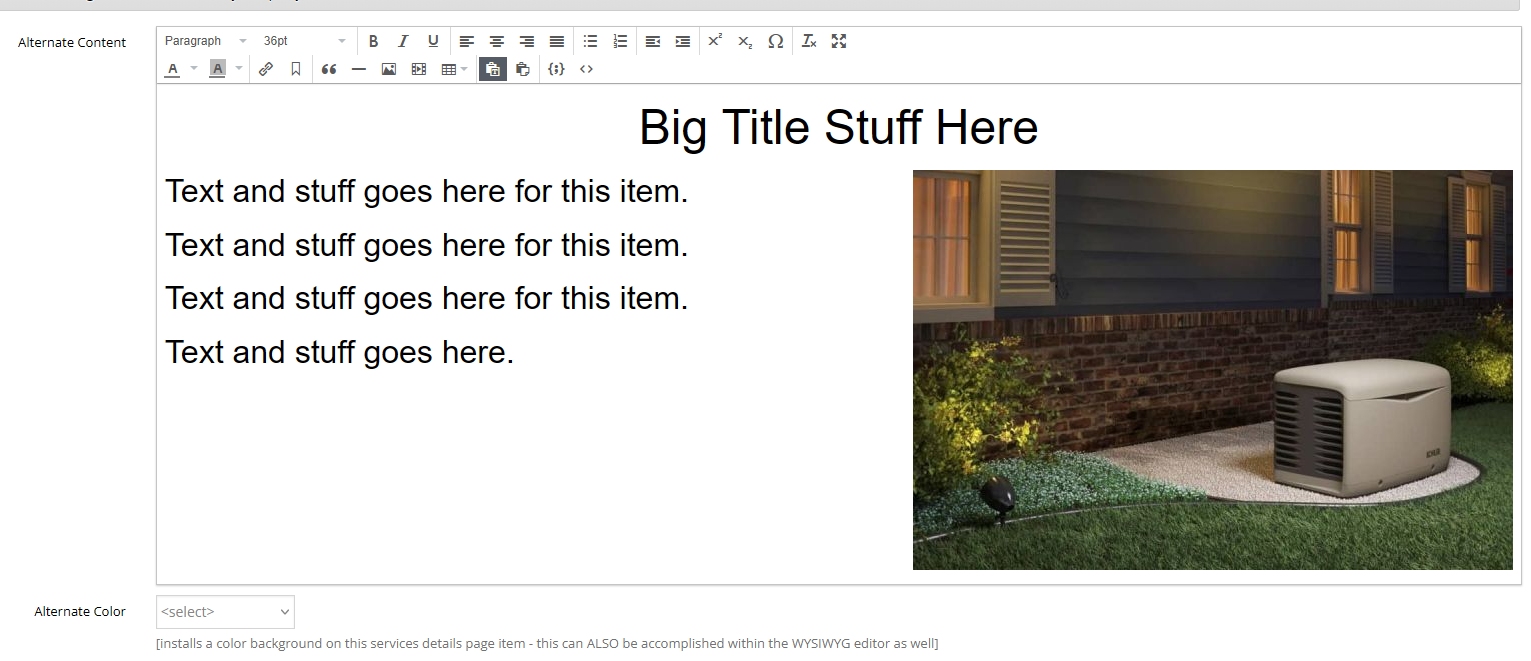
Bug with the WYSIWYG function. Added Title (centered bold), list text (on the left) and a photo to float right. My WYSIWYG field title is "alternate_content"The php/html code on the Details page was simple (and has worked in the past):
<?php if ($servicesRecord['alternate_content']): ?>
	<div<?php if ($servicesRecord['alternate_color']): ?> style="background-color:#<?php echo $servicesRecord['alternate_color'] ?>;"<?php endif ?>>
		<div class="breathingspace">
			<div class="altpage">
			<?php echo $servicesRecord['alternate_content'] ?>
			</div>
		</div>
	</div>
<?php endif ?>
The stylesheet for "altpage" div is simple:
.altpage	{
	width: 100%;
	padding: 10px;
	border: 10px;
}
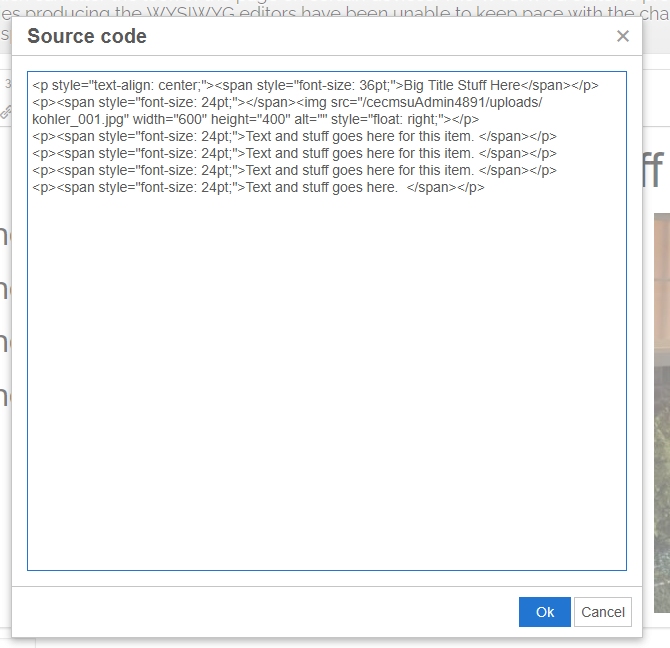
Attached are screenshots of the cmsb WYSIWYG field filled in, and the resulting source code.
What should happen, and used to happen, is all the WYSIWYG code gets dumped into the Details page between my html/php code (as outlined above in the "altpage" div) and should be fine after that. I typically do not use a "clearing" code in the css as haven't for years (maybe that's a fix if the WYSIWYG isn't going to change?). What happens in the browser is the data from the WYSIWYG field breaks out of, and through, the divs. I tried to deleting and redoing it...it's a consistent issue. Do you think I need to adjust my php/html or is this truly a bug?
Thanks in advance.
Codee
By zaba - March 2, 2026
Remove the surrounding <p> tag around the image. You have to be careful when using the WYSIWYG editor, always check the source to see if it has been applied correctly.
<p style="text-align: center, ><span style="font-size: 36pt; >Big Title Stuff Here</span></p>
<img src="/cecmsuAdmin4891/uploads/kohler_001.jpg" width="600" height="400" alt=''style=float: right;/>
<p›<span style="font-size: 24pt:">Text and stuff goes here for this item. </span></p> <p›<span style="font-size: 24pt;">Text and stuff goes here for this item. </span></p>
<p><span style="font-size: 24pt,"> Text and stuff goes here for this item. </span></p>
<p><span style="font-size: 24pt;"> Text and stuff goes here. </span></p>By Codee - March 2, 2026
Thanks, zaba! That partially corrected it, until the content in the WYSIWYG field was modified again and, frankly, the client will have no clue about modifying the source code in the cmsb wysiwyg panel. I just modified the php page and added a second wrapper div (with the clearfix hack) inside my altpage div. This ensures the image and the surrounding divs don't run into each other.
So, not a bug...just needed to adjust my html/php/css code. I appreciate it.
By zaba - March 2, 2026
Look in to css grid. I rarely upload images into the WYSIWYG field. Use a separate upload field. You have more control with aligning in your code. No hacks.
By Codee - March 3, 2026
Agreed! Already done that....years ago. I stopped using/recommending the WYSIWYG but just recently got a new client that insists on the option so I'm providing it and adjusting it to the best of my ability. Thanks for your input and support. I appreciate it and the actions of this forum. I also appreciate CMSB and the I.T. staff for an incredible product/service over the years.
By zaba - March 3, 2026
I'll second that CMSB has helped pay my mortgage over the years, the cmsb team are second to none, and this software is absolutely superb. I lost a big client who moved from me to a company specialising on a wrodpress (your logo here) generic solution. They were not happy with the site or the wordpress complicated hassle of a content management system. They came back, and were once again happy with the cms and my front end bespoke design. It's such a delight to use cmsb and you can build practically anything with it, its fast and robust. Thanks Dave and the guys, it's been 20 years since I discovered you I think. Long may it continue!
By kitsguru - March 3, 2026
No argument here, Dave and his crew have been great. Almost 20 years for me too. I also have lost clients to wordpress and had them come back a year later.
yaadev.com