CMSB v3.83 Beta (Show/Hide Fields & MCP Server)
11 posts by 3 authors in: Forums > CMS Builder
Last Post: May 8 (RSS)
By Dave - April 14, 2026 - edited: April 14, 2026
Hi everyone,
We've just released v3.83 beta (our biggest single release to date!), and we're already running it on our site.
Here are some highlights from this release:
- Field Editor
- Show If: New option allows you to dynamically show/hide fields based on the values of other fields
- Show for: Replaces old "Admin only" setting with options for everyone, editor, admin only, or new: Nobody (completely hidden)
- Placeholder: New option for text and textbox fields to set hint text inside the field when empty
- Field List UI: Lock and eye icons now mark restricted and conditional fields in your field list
- Reorganized and simplified the field editor UI
- Admin → Advanced → MCP Server
- AI coding assistants like Claude Code can now read and update your CMS directly
- Read and write records, upload files, run queries, and view your database schema
- Built-in /fix-cms command: AI reviews your recent PHP errors and offers fixes
- Admin → Backup & Restore → Website → Restore from Zip
- Added restore button to restore from previous website backup zips (for uploading a local or dev site)
- Fields → List → pillbox (multi value)
- Selected values can now be drag sorted to change the order
- Dropdown options show checkboxes to select multiple values (easier for end-users)
- Admin → Advanced
- Admin Favicon: Pick a colored favicon (green/yellow/red) to tell CMS installs apart in your browser tabs (e.g. dev, staging, live)
- Server Links: Add dev, staging, and live server URLs for quick-switching between environments
- Developer Console
- Automatically decrypts and displays contents from encrypted fields
- General code modernization and cleanup
Note: We still have a queue of pending user feature requests. We're releasing what we have now so you can start using it. Feel free to remind us what you'd like to see next.
The full changelog for this release is as follows:
*** April 14, 2026 - Version 3.83 (Show/Hide Fields & MCP Server)

SERVER REQUIREMENTS (Since Jun 2025): PHP 8.1+ and MySQL 5.7+ (or MariaDB 10.2+)

FIELD EDITOR
    - Show/Hide Fields: Fields now show/hide automatically based on what users select
        - Example: Show "Speaker Name" only when Event Type is "Webinar"
        - Example: Show "Shipping Address" only when Delivery Method is "Mail"
        - Works with all field types: text, checkboxes, tabs, upload fields, related records
        - Custom expressions allow for multi-field AND rules (e.g. type=article AND status!=draft|hidden)
        - Configure in: Database > Edit Field > Visibility > Show If
    - Field Access: "Admin Only" replaced with clearer "Show for" dropdown
        - Options: Everyone, Editor and above, Admin only, or new: Nobody (completely hidden)
    - Placeholder: New option for text and textbox fields to set hint text inside the field when empty
    - Lock and eye icons now mark restricted and conditional fields in your field list
    - Simplified field editor interface with cleaner organization
    - Textbox Fields: "Auto Format" renamed to "Line Breaks" (nl2br) and deprecated. Off for new fields, can be turned off but not back on

MCP SERVER
    - AI coding assistants like Claude Code can now read and update your CMS directly
    - Read and write records, upload files, run queries, and view your database schema
    - Configure in: Admin > Advanced > MCP Server (IP allowlist, API keys, permissions)
    - Built-in /fix-cms command: AI reviews your recent PHP errors and offers fixes
    - Security: IP allowlist required, Bearer token auth, read-only enforced at MySQL session level
    - Write operations logged to the audit log

ADMIN > BACKUP & RESTORE
    - Website: Added restore button to restore from previous website backup zips
    - Website: Previous Backups dropdown now shows relative dates (e.g., "5 min ago", "yesterday")
    - Website: Removed "Only include code files" option (use .cms-no-backup marker files to exclude folders instead)
    - Database: Backup dropdown now offers option to include log tables in backup ("include skipped")

PILLBOX & FOREIGN KEY FIELDS
    - Replaced form dropdown component Select2 with Tom Select
    - Pillbox: drag pills to reorder selected values
    - Pillbox: dropdown options show checkboxes so you can see all options and their selection state at a glance
    - Type-ahead search to filter options instantly

ADMIN > ADVANCED (New Page)
    - Reorganized admin settings into "Admin Interface" and "Advanced Settings" sections
    - Admin Favicon: Pick a colored favicon (green/yellow/red) to tell CMS installs apart in your browser tabs
    - Server Links: Add dev, staging, and live server URLs for quick-switching between environments
    - Admin Shortcuts, Debug Footer, and WYSIWYG/Menu/Cookie settings moved here from General Settings

MINOR CHANGES
    - Email Settings: Developer Email now accepts multiple comma-separated addresses
    - File Uploads: Files are saved with dashes instead of underscores for better SEO, and .jpeg is normalized to .jpg
    - Audit Log: Expanded logging coverage for fields, tables, uploads, backups, and database operations
    - Security: Added additional .htaccess hardening for data directories (Apache 2.4+ compatibility)
    - Improved text contrast for input fields, selects, and placeholders
    - Admin menus updated and reorganized for better usability
    - Upgraded Dependencies: PHPMailer v6 to v7, Firebase/JWT v6 to v7, and other library updates

BUG FIXES
    - SmartArray: Fixed TypeError when calling load() on SmartArrayHtml (changed type hint to SmartArrayBase)
    - Language: Fixed "No such file or directory" error when developer mode was enabled without a language selected
    - Upload Fields: Fixed "Create Thumbnail" checkbox re-enabling itself after saving when unchecked
    - Edit Page: Fixed false "unsaved changes" warning appearing after clicking in fields without editing them
    - Misc code and other minor improvements

**FOR PROGRAMMERS**
    - Modern PHP features enabled:
        - Native types: Database queries now return native PHP types (int/float) instead of strings
        - mysqli::execute_query() for one-line parameterized queries (available natively in PHP 8.2+, backported for PHP 8.1):
            $rows = DB::$mysqli->execute_query("SELECT * FROM users WHERE id = ?", [$id])->fetch_all(MYSQLI_ASSOC);
            DB::$mysqli->execute_query("UPDATE users SET name = ? WHERE id = ?", [$name, $id]);
    - Database Encryption: Key now cached as MySQL session variable @ek
        - Faster: Computed once per-connection, not per-query
        - Simpler: AES_ENCRYPT(val, @ek) instead of AES_ENCRYPT(val, UNHEX(SHA2('key',512)))
        - Cleaner: Key hidden from SHOW PROCESSLIST and error messages
        - On-demand: Only initialized when encrypted fields are used
    - MySQL Console: Record edit page database icon now opens console with that record in column mode
    - MySQL Console: New {{column}} shortcut auto-expands to AES_DECRYPT(`column`, @ek) for encrypted columns
    - Moved /api.php to /api/ to better organize future API endpoints

**FOR PROGRAMMERS (BREAKING CHANGES)**
    - Note: These changes only impact developers who have written custom PHP code
    - Database queries now return native PHP types (int/float) instead of strings
        - If your code expects strings, cast them: (string)$row['id']
    - MySQL queries now throw exceptions instead of returning false (following PHP 8.1+ standard behavior).
        - Before: $result = mysqli()->query($sql) or die("MySQL Error: " . mysqli()->error);
        - After:  try { $result = mysqli()->query($sql); } catch (mysqli_sql_exception $e) { die("MySQL Error: " . $e->getMessage()); }
    - Library Updates: ZenDB has been moved to composer with several renamed and deprecated methods
        - DB::get() renamed to DB::selectOne() (DB::get() still works but is deprecated)
        - See ZenDB docs for full list of changes: https://github.com/interactivetools-com/ZenDB/
You can download the latest beta here: https://www.interactivetools.com/download/
Please post (or email) any feedback, questions, concerns, or bugs you find. Your help with beta testing allows us to release new features even faster.
Thanks. We look forward to your feedback! :)
interactivetools.com
By KennyH - April 21, 2026 - edited: April 21, 2026
I had my Claude Code do some testing on our end in VS Code. I had developed my own MCP a few months back and we were able to compare that one with with this native one. Here's Claude's take after doing some extensive testing guided by my instructions. I had Claude write the summary for this forum post:
MCP Server Beta Feedback — v3.83
We've been testing the new MCP Server hard over the last few days. Big picture: this is a well-designed server. The tool surface is thoughtful, naming is consistent, the layered IP + bearer auth is above typical MCP quality, and the instructions block on initialize is the best I've seen anywhere — you explicitly tell the model when to use CMSB MCP over raw MySQL, warn about hook/timestamp gaps, and point to cmsApiPublic / cmsSignature as guardrails against hallucinated APIs. That's exactly the failure mode those tools should address, and most MCP servers don't bother.
That said, there are some real issues worth flagging before this comes out of beta. Posting them here in severity order so others testing can corroborate or tell me I'm wrong.
Security — Pre-auth info disclosure
Bearer auth is currently only enforced on tools/call. With no Authorization header at all, I was still able to get back:
- The full
initializeresponse includingserverInfo.descriptionand the long instructions block - All 19 tool definitions via
tools/list - Both prompt names and — via
prompts/get cms-logs— the entire prompt body, which enumerates internal table names (_error_log,_log_audit,_cron_log,_outgoing_mail) and internal settings keys (serverChangeLog,bgtasks_lastRun,mail.outgoingMail)
Tool invocation itself is safe — I correctly got No Bearer token provided / Invalid API key when I tried to call anything. So this isn't a data breach. But it's pre-auth info disclosure against anyone who's already past the IP allowlist, and if a user ever clears the allowlist the whole discovery surface becomes public.
Fix: require the bearer on every method, not just tools/call.
Bugs
1. cmsApiSearch emits raw PHP warnings before the JSON-RPC payload.
Calling cmsApiSearch {"query":"DB::sel"} returns six PHP warnings, then the JSON:
Warning: include(.../vendor/composer/../../lib/ImageFactory.php): Failed to open stream: No such file or directory in .../cmsb/api/mcp.php:1081
Warning: include(.../vendor/composer/../../lib/Validator.php): Failed to open stream: No such file or directory in .../cmsb/api/mcp.php:1081
... (6 warnings total)
{"jsonrpc":"2.0",...}
Two problems with this:
- Strict JSON / SSE MCP clients will fail to parse. curl tolerates it; a real MCP client may not.
- It leaks absolute filesystem paths.
cmsErrorSummary confirmed these are real errors — it groups six matching entries on mcp.php:1081. Looks like an autoloader/composer issue where ImageFactory and Validator are referenced but not present. Fresh composer dump-autoload might do it.
2. Unknown methods return a fake tool result instead of a JSON-RPC error.
resources/list returns:
{"jsonrpc":"2.0","id":51,"result":{"content":[{"type":"text","text":"Unknown method: resources/list"}],"isError":true}}
Per the JSON-RPC spec this should be {"error":{"code":-32601,"message":"Method not found"}}. Clients that branch on protocol-level errors vs. tool-level errors (most proper MCP clients) will mis-handle this. Same pattern shows up for notifications/initialized returning "Invalid JSON-RPC version" wrapped in a fake result.
3. initialize returns protocolVersion: "2025-11-25" regardless of what the client sent.
I sent "2025-06-18"; the server echoed "2025-11-25". The MCP spec says the server must return the client's requested version if supported, or the highest it supports that's ≤ the client's. Hardcoding a single (and future-dated) version can break strict clients.
4. selectOne silently coerces string → int.
selectOne {"table":"recipes","num":"abc"} returns Record not found: recipes num=abc rather than a validation error. The inputSchema declares num: integer — the server should reject this at schema validation. As-is, "bad input" and "real miss" are indistinguishable to a model.
Tool-design suggestions
listTablesandcmsErrorSummarytake no args. A filter/prefix onlistTables(98 tables on a small install; could be much larger elsewhere) andlimit/since/minCountoncmsErrorSummarywould scale better.query/queryWritetake raw SQL, which means a model that bypasses the safer helpers can still do anything. Documenting that tradeoff ininstructionsis great. Consider adryRunoption onqueryWritethat runsEXPLAINplus (forDELETE/UPDATE) reports affected-row count without committing.queryWrite'sdestructiveHint: trueannotation is good, but surfacing affected-rows count on success would make model behavior safer still.- No
_meta/version on tool responses. While the output shape is still changing in beta, aversionfield would help clients detect drift. cmsApiPublic's docstring explicitly says "cheap to call" — that's a nice explicit cost signal to the model. More MCP servers should do this.
What's working well
Not just being nice — these are design wins worth calling out so they survive the next round of changes:
- The
instructionsblock. Already mentioned above; it's genuinely excellent. - Error messages point the human to the fix UI. "Add it in Admin > Advanced > MCP Server > Allowed IPs" and "Check the Authorization header in your
.mcp.jsonfile" tell the human what to do, not just what went wrong. That's the gold standard. cmsApiSearch+cmsSignatureis a clever pair. The signature response returns file / line / class / inheritance / signature / docblock — exactly the right shape for keeping models from inventing function signatures against stale training data.cmsInfo.customUploadDirssurfacing per-field upload overrides is a thoughtful touch. Anything touching uploads needs exactly this.- Defense in depth is real here. Password redaction in settings worked. MySQL system-table denial worked. Read-only
querycorrectly rejectedDELETEwith a clear message pointing toqueryWrite. - The two prompts (
cms-logs,cms-fix) are substantive runbooks, not placeholder stubs.
Comparison notes — running CMSB MCP alongside our fleet MCP
Some context: we run our own MCP server (mcp.sagentic.dev) for fleet-level portfolio management across 100+ client sites — it's purpose-built endpoints for domain management, support logs, cross-site reports, that kind of thing. Built on the official PHP MCP SDK v0.4.0. It's a very different animal from CMSB MCP (fleet control plane vs. single-site database plane), and we're treating them as complementary, not competing.
Running them side-by-side did surface some patterns worth sharing in both directions.
Things CMSB MCP could borrow
-
Tiered API keys. Our server has creator / standard / full / write tiers with field-level visibility differences — e.g., creator-tier responses hide credentials while standard-tier hides sensitive notes. CMSB has one key and a single "Allow write access" checkbox. For site owners wanting to give a lower-trust AI client read-only access to a subset of tables, tiering would be a big deal.
-
Implement MCP Resources.
resources/listcurrently returns "Unknown method." Natural candidates for CMSB:cmsb://schema/index,cmsb://schema/{table},cmsb://settings(non-sensitive subset),cmsb://errorlog/recent. Resources are proactively loadable, which fits AI workflows better than on-demand tool calls for schema/reference data. -
Proper JSON-RPC error codes. Using
-32001 Invalid API key,-32600 Invalid request,-32603 Error while executing toollets strict clients branch on error class. CMSB currently returns everything as a successful result withisError: trueand the reason in a prose string. Already covered above but worth reinforcing — this is what the PHP MCP SDK gives you for free. -
Sessions +
Mcp-Session-Id. Streamable HTTP per the MCP spec expects session management. Stateless is tolerable today but forecloses future features (subscriptions, progress notifications,listChangedevents — CMSB advertises both asfalseon the capability flags, which confirms these haven't been wired up). -
Moving to the official PHP MCP SDK (
mcp/sdkv0.4.0). The protocol-level quirks I listed above (hardcodedprotocolVersion, fake results for unknown methods, PHP warnings in response bodies) all smell like hand-rolled JSON-RPC. The SDK gives you sessions, error codes, and resource/prompt handling for free. There's one known SDK bug — it silently fails to discover#[McpResource]attributes, so you have to register manually viaaddResource()— but everything else Just Works. -
Prompts with arguments. Our prompts take parameters like
use_skill(skill, domain, context)to customize the workflow. CMSB'scms-logs/cms-fixare static. Both are valid, but parameterized scales better.
Things our servers should borrow from CMSB
Being honest — CMSB MCP has some patterns our custom servers don't, that we should steal:
-
Live schema / API introspection (
cmsSchema,cmsApiSearch,cmsSignature). Our own troubleshooting doc literally calls out two schema quirks — "usesskill_content, notcontent" and "noapi_idcolumn." That's the exact failure mode these tools solve. A schema-lookup endpoint would make those quirks discoverable rather than doc-resident. -
The
instructionsblock. We have equivalent guidance in our.guides/*.mdbut it's not wired into the server'sinitializeresponse. The PHP SDK supports this — just populate it. -
UI-pointing error messages. Ours say "Invalid or missing API key. Provide via X-API-Key header or key query parameter." Yours say "Your IP is 170.000.000.000. Add it in Admin > Advanced > MCP Server > Allowed IPs." The difference in helpfulness is real.
Audit logging — question for the devs
CMSB has both _log_audit and api_audit_log tables. Can you confirm MCP writes (insert / update / delete / queryWrite / uploads) are landing in one of them? Didn't see explicit confirmation in the docs and it matters for compliance use cases. If cmsErrorSummary is intended to be the canonical surface for MCP-origin errors specifically (vs. generic PHP errors from the whole site), that'd be worth documenting too.
Suggested priority
- P0 — Require bearer auth on
initialize/tools/list/prompts/*. - P0 — Fix whatever's missing at
mcp.php:1081socmsApiSearchstops emitting PHP warnings into the response stream. - P1 — Switch unknown-method / protocol-error paths to real JSON-RPC error objects with proper codes.
- P1 — Echo the client's
protocolVersion(or negotiate downward) instead of hardcoding2025-11-25. - P2 — Strict type validation on tool inputs (reject
num: "abc"rather than coercing). - P3 — Filter/limit args on
listTablesandcmsErrorSummary;dryRunonqueryWrite.
I didn't run any write operations (insert / update / delete / upload) against production data.
Overall, really good work on this release. The MCP server is a genuinely useful addition to CMSB and most of what I flagged above is protocol-correctness polish rather than design problems. Looking forward to v3.83 final.
Thanks - Claude
Kenny H
By Dave - April 23, 2026
Hi Kenny,
Thanks for the feedback.
In general, we write to the spec, but optimize for the client application and user experience. Same as when new HTML features are in that spec, but not fully supported by the browsers.
So for this first release, we're targeting the latest release of Claude Code and whatever makes our workflow fastest with it. If anyone has another AI agent we can make work with a few adjustments, we'd be happy to do that as well.
Some updates:
- MCP tools now all return generic info (nothing server-specific). If you are token and IP-authenticated, they'll add some server hints for the agent.
- cmsApiSearch errors: Good catch! Those are unreleased future libraries that we're not including yet, and they shouldn't be referenced or cause errors. Fixed.
- JSON-RPC errors: These were killing the AI session previously (requiring a restart) and not allowing us to pass info back to the user, but they're working now, so we'll switch back to them. Our key requirement here is relaying setup hints to the user (e.g. your IP doesn't match or you need to enable a setting) rather than having them dig through logs.
- protocolVersion: We only list the latest version because that's the only one we're targeting and supporting. I think we can go one further back, though, so I've updated it to this range ('2025-11-25', '2025-06-18')
- selectOne silently coerces string → int: MySQL also coerces strings to ints, so it still works. I'm not aware of a case where this would cause an issue. But we'll add some error checking.
We'll have these in the next beta.
Let me know any questions, or other feedback. Thanks!
interactivetools.com
In 3.83 Beta - I am not finding the textbox option to not insert <br> tags. I saw a button appear that asked if I wanted to remove them and I clicked it. It didn't remove the tags from the 1 entry I saved. I went to the schema and can't find that option any longer.
Kenny H
Hi Kenny,
You can manually add that feature back by adding either of these to the field schema:
- 'autoFormat' => 1,
- 'nl2br' => 1, (new name)
We're removing it because we want to standardize on either text or HTML, and that field type is a mix of both. So we can't fully html encode it, or treat it as text. For fully text fields you can get the same effect in the viewers with echo nl2br(htmlencode($record['name']));
You said the <br> tags didn't get removed. Could you email or post a screenshot of the data with the <br> tags from the MySQL Console (see attached example) so I can see what the pattern is that didn't get replaced? I can then work on a fix for that.
Thank you!
interactivetools.com
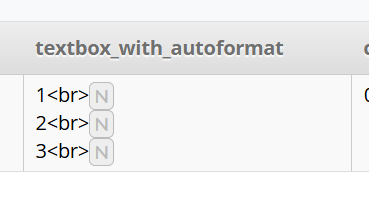
I have spent quite a bit of time trying to recreate this issue or even find the one example I had for you. I must have dreamed the whole thing! If I see it again, I'll report back.
echo nl2br(htmlencode($record['name'])); should be easy to implement and probably less frustrating because I always forgot to check that box anyway with any new build or schema, and had to go back in and do it.
Kenny H
Hi 4cdg,
It's the new "default," but you store your uploads wherever you want, and you don't need to change it for existing sites.
Some of the reasons for the change are to prevent upload paths from revealing the url of your cmsb admin, shorter/nicer urls, and making it easier to backup just the /cmsb/ folder without a very large uploads subfolder.
interactivetools.com
Hi everyone,
We've just posted Beta 2 (build 3126). Thanks to everyone who's been posting and sending in feedback and bug reports on Beta 1.
Here's what's new:
MCP Server
- New auto-disable timer -The MCP Server can now be enabled with an auto-disable timer (15 min / 1 hour / 8 hours). The server turns itself off automatically when the timer expires, so you can safely turn it on for a coding session and not have to remember to switch it off afterward. Configure in: Admin → Advanced → MCP Server.
- Execute Access - This allows AI to read the server filesystem, run shell commands, and execute PHP. This is incredibly powerful for quickly diagnosing server issues, but be sure to backup first, manually approve everything but read-only commands, and actively monitor AI agents using it.
Show/Hide Fields Polish
- Custom Expressions: OR rules now supported, e.g.: type=article|review AND published=1 OR alwaysShow=1 (mouse over the custom expression field for a pop-up with instructions)
Plus lots of bug fixes and minor improvements.
You can download the latest beta here:https://www.interactivetools.com/download/
Send over any other issues you find. We're aiming to release this in the next few days if no further issues are reported.
Thanks!
interactivetools.com