CMSB v3.82 Beta (Improved UI, Menu Count Badges, & .env support)
16 posts by 4 authors in: Forums > CMS Builder
Last Post: January 11, 2026 (RSS)
By Dave - December 29, 2025 - edited: December 29, 2025
Hi everyone,
We've just released v3.82 beta, and we're already running it on our site.
Here are some highlights from this release:
- Database Editor
- We've reorganized the Database Editor tabs to make it easier to find what you're looking for.
- Menu Record Counts
- You can now show record counts on any menu with: Database Editor > Menu Link (tab) > Show Record Count
- And record counts for all menus now load via Ajax for faster initial page load time
- .env.php Support
- You can now store sensitive credentials outside of your web root with .env.php files. See the included .env.example.php file to instructions
- This is mainly useful when you want to keep your passwords out of git or backup files.
- We've also made many minor UI improvements throughout the interface
- General code modernization and cleanup
Note: We still have a queue of pending user feature requests. We're releasing what we have now so you can start using it. Feel free to remind us what you'd like to see next.
The full changelog for this release is as follows:
*** December 29, 2025 - Version 3.82 (Improved UI, Menu Count Badges, & .env support)

SERVER REQUIREMENTS (Since Jun 2025): PHP 8.1+ and MySQL 5.7+ (or MariaDB 10.2+)

NEW FEATURES
- Database Editor: Added "Show record count in menu" option to display record count badge next to menu items
- .env.php Support: Optionally store sensitive credentials in a separate file outside your web root.
    - Safely commit settings files to git without exposing secrets
    - Back up your data folder without including credentials
    - Uses .php extension so credentials can't be viewed via direct URL access
    - See .env.example.php for details and instructions

MINOR CHANGES
- Database Editor: Reorganized Section Editor tabs and fields with improved layout
- Editor UI: Create button now supports middle-click to open in a new tab
- Editor UI: Editor instructions now display in a dashed border box for better visibility

FOR PROGRAMMERS
- SmartArray: Major refactor with ~50% better performance (removed ArrayObject dependency)
    - New sprintf() method - applies formatting to each element with auto HTML-encoding
        - Supports {value} and {key} as readable aliases for sprintf formats
        - Example (table cells): <tr><?= $row->sprintf("<td>{value}</td>")->implode() ?></tr>
        - Example (headers): <tr><?= $row->keys()->sprintf("<th>{value}</th>")->implode() ?></tr>
    - Array access deprecated: $array['key'] → use $array->key or $array->get('key')

FOR PROGRAMMERS (BREAKING CHANGES)
- Note: These changes only impact developers who have written custom PHP code using the following features
- .env.php: Code using $_ENV['key'] must be updated to \CMS::env('key')
- SmartArray: Class hierarchy changed (only affects custom function type hints)
    - Example: function yourCustomFunction(SmartArray $input): SmartArray
    - Replace SmartArray with:
        - SmartArrayBase - any SmartArray type (safe default)
        - SmartArrayHtml - HTML-encoded data (from ZenDB)
        - SmartArray - raw/unencoded data

BUG FIXES
- CMS Link Menus: Fixed error when Authors clicked link menus ("This section isn't configured to allow 'Author' user access")
- CMS Record Lists: Viewers can now see menus and lists even when View isn't enabled (only hides the view link)
- Misc code and other minor improvements
You can download the latest beta here: https://www.interactivetools.com/download/
Please post (or email) any feedback, questions, concerns, or bugs you find. Your help with beta testing allows us to release new features even faster.
Thanks. We look forward to your feedback! :)
interactivetools.com
By Dave - December 29, 2025
Update: Just released Beta 2 with fixes for some PHP warnings we discovered. It's available for download here:
https://www.interactivetools.com/download/
interactivetools.com
By KennyH - December 29, 2025 - edited: December 30, 2025
First off, there are some really nice improvements to the UI/UX - really enjoying these changes especially!
I did run into a couple of issues. I took screenshots to help illustrate.
- When I go to CMS Setup >Database> *Database Table* the last two tabs (Advanced and MySQL Source) are aligned to the right and separated from the first three tabs. Is this intentional?
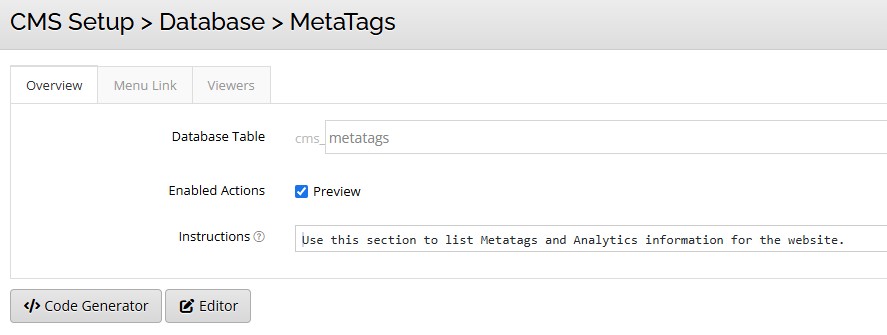
- When I go to a single-record table > Enabled Actions > Preview (is the only option available). If I click save and try to visit that item, I get "Modifying records has been disabled for this section!"
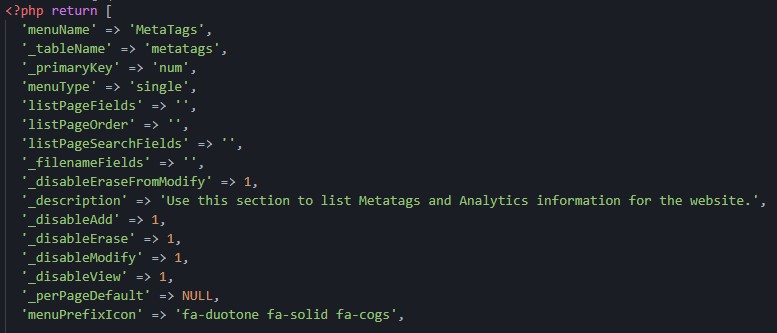
I can manually change it back in the schema, but if I save it through the interface, it reverts back to '_disableModify' => 1,
Still looking at other stuff, but this is pretty cool so far!
Kenny H

By Dave - December 30, 2025
Hi Kenny,
Great, glad to hear you're liking the UI/UX changes! We're always trying to streamline our own process and looking for those micro-optimizations that will save us cumulative time day after day.
1. When I go to CMS Setup >Database> *Database Table* the last two tabs (Advanced and MySQL Source) are aligned to the right and separated from the first three tabs. Is this intentional?
Yes, this is intentional, although I know split tabs are a less common pattern. The thought is to visually separate the everyday settings from more technical options that most users can safely ignore. The primary tabs (Overview, Menu Link, List Page, Viewers) are grouped on the left, where users naturally start, while Advanced and MySQL Source are available but visually de-emphasized on the right. This helps reduce cognitive load for typical users while keeping power-user features accessible when needed. The "Advanced" tab label already signals the nature of those tabs, but we're always open to feedback - if the separation feels confusing or causes friction in practice, let us know and we can revisit it in a future update.
It took a little bit to get used to, but I've been using it for a while and find it simpler and faster. Those menus may continue to evolve as we add new features that need configuration options.
2. When I go to a single-record table > Enabled Actions > Preview (is the only option available). If I click save and try to visit that item, I get "Modifying records has been disabled for this section!"
I can manually change it back in the schema, but if I save it through the interface, it reverts back to '_disableModify' => 1,
Good catch, I've just released beta 3 with that issue fixed, along with everything else reported to date.
Thanks for the feedback!
interactivetools.com
By kitsguru - December 30, 2025 - edited: December 30, 2025
I updated an old install of CMSB 3.67 to 3.82 beta 3 and got this error:
MySQL Error(1054): Error writing to error database: Unknown column 'debug_data' in 'INSERT INTO'
Original error: NoDecodeDelegateForThisImageFormat `/Volumes/J/@projects/cmsb-beta/html/www/cmsb/data/temp/upload_oCCs9Q' @ error/constitute.c/ReadImage/752 in /Volumes/J/@projects/cmsb-beta/html/www/cmsb/lib/image_functions.php:194
Might be a red herring as I had not copied the error schema from the downloaded code.
yaadev.com
By Dave - December 30, 2025
Hi Jeff,
Can you confirm if /data/_error_log.schema.php was updated and if it contains a field schema for debug_data?
If it's there but it didn't get created clicking on "Database Editor" on the menu automatically checks for and recreates missing fields. But let me know because it should be created automatically.
interactivetools.com
no it did not get created automatically
Also now getting this error when I try to upload an image.
Upload Details
Error: NoDecodeDelegateForThisImageFormat `/Volumes/J/@projects/cmsb-beta/html/www/cmsb/data/temp/upload_lLjju9' @ error/constitute.c/ReadImage/752 in /Volumes/J/@projects/cmsb-beta/html/www/cmsb/lib/image_functions.php:194 [Admin View]

Backtrace:
#0 Script started at /Volumes/J/@projects/cmsb-beta/html/www/cmsb/admin.php:0
#1 require() at /Volumes/J/@projects/cmsb-beta/html/www/cmsb/admin.php:81
#2 require() at /Volumes/J/@projects/cmsb-beta/html/www/cmsb/lib/menus/default/actionHandler.php:103
#3 require() at /Volumes/J/@projects/cmsb-beta/html/www/cmsb/lib/menus/default/uploadForm.php:4
#4 submitUploadForm() at /Volumes/J/@projects/cmsb-beta/html/www/cmsb/lib/menus/default/uploadForm_functions.php:21
#5 saveUpload() at /Volumes/J/@projects/cmsb-beta/html/www/cmsb/lib/menus/default/uploadForm_functions.php:41
#6 _image_fixJpegExifOrientation() at /Volumes/J/@projects/cmsb-beta/html/www/cmsb/lib/upload_functions.php:265
#7 Imagick->__construct() at /Volumes/J/@projects/cmsb-beta/html/www/cmsb/lib/image_functions.php:194
#8 ImagickException(420) thrown at /Volumes/J/@projects/cmsb-beta/html/www/cmsb/lib/image_functions.php:194
PHP v8.3.28 (phpinfo) - View Errors and Warnings (4) >>
Running as jeffshields under Apache 2.0 Handler and using config files:
/opt/homebrew/etc/php/8.3/php.ini
/Volumes/J/@projects/cmsb-beta/html/www/cmsb/.htaccess
/opt/homebrew/etc/php/8.3/conf.d/20-imagick.ini
/opt/homebrew/etc/php/8.3/conf.d/20-xdebug.ini
/opt/homebrew/etc/php/8.3/conf.d/20-yaml.ini
/opt/homebrew/etc/php/8.3/conf.d/ext-apcu.ini
/opt/homebrew/etc/php/8.3/conf.d/ext-opcache.ini
Caching Modules: Zend OPCache (PHP files cached - 2s update delay) reset cache
Image Modules: gd, imagick yaadev.com
By KennyH - December 31, 2025 - edited: December 31, 2025
The split tabs are just fine and make sense to me. I just wanted make sure.
I was just building a huge schema and am going back to check on which fields should be required and which ones not. I was then thinking a red asterisks on the editor pages would be really nice for required fields. Probably in the same spot as the circle-question icon or even before the label itself.
I'll start testing the new beta today on some projects I am working on. Happy 2026!
Kenny H
By Dave - January 1, 2026
Hi Kenny,
I'll make a note of the required field suggestion for future releases. That's a good idea.
Thanks!
interactivetools.com
By Dave - January 1, 2026
Hi Jeff,
Thanks for the reports!
I tried upgrading from 3.67 to 3.82 locally, but couldn't reproduce the issue. Let me know if that comes up again.
For the "NoDecodeDelegateForThisImageFormat" errors, this typically means that ImageMagick is installed on your server but is missing the JPEG "delegate" (the underlying library it uses to decode JPEG files). Another cause can be if the library is built for a different PHP version. You may need to reinstall it.
That said, we're releasing an updated beta shortly that handles this more gracefully. If ImageMagick can't open a file for any reason, we'll automatically fall back to PHP's built-in GD library instead of throwing an error. Uploads will work either way.
Thanks!
interactivetools.com